
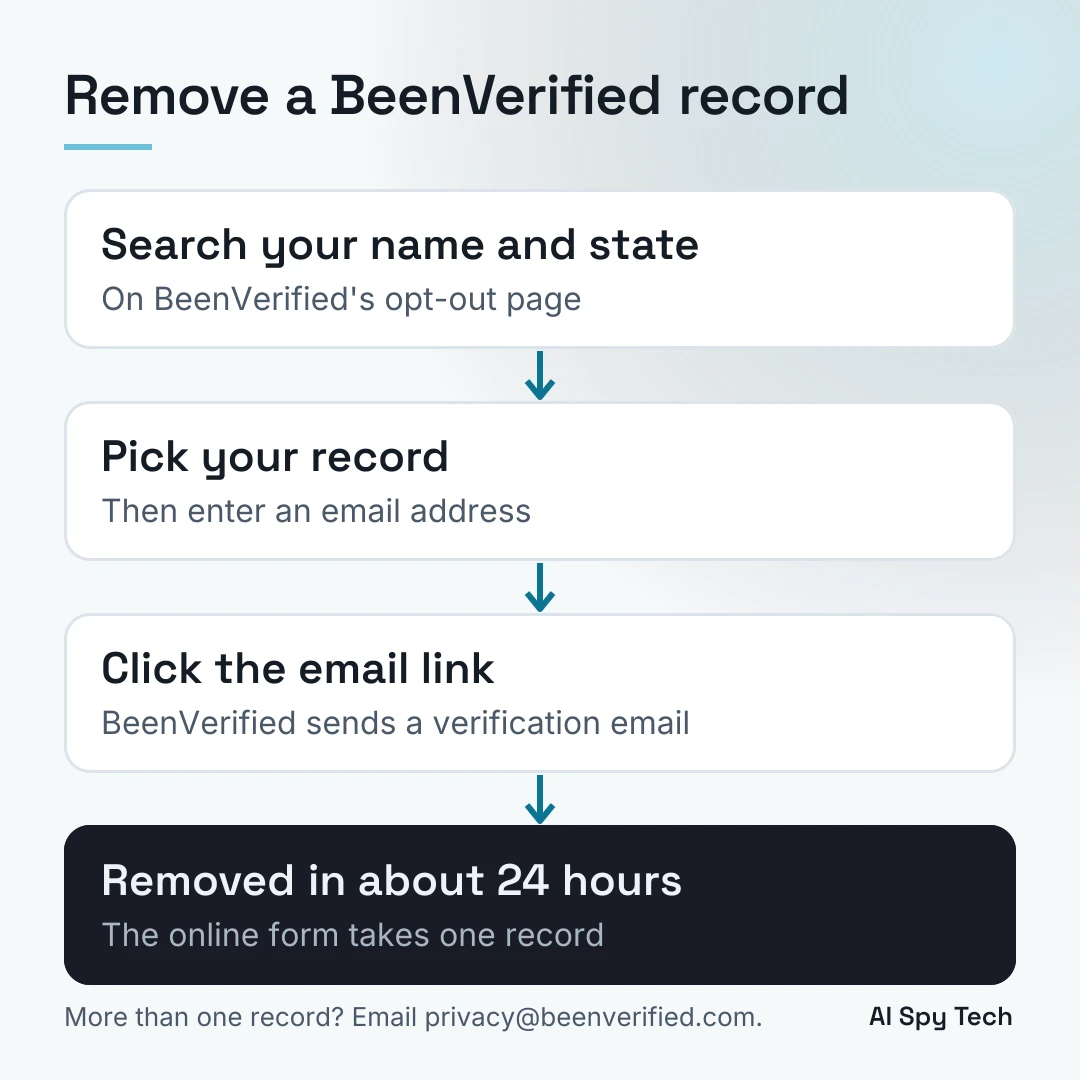
BeenVerified removes a record from its people search for free, and you do not need an account. Search your name and state on its opt-out page, pick your record, enter an email address, then click the link in the verification email. BeenVerified says the change usually shows within 24 hours of its confirmation email. The online form removes only one record. For any others, email privacy@beenverified.com.
Every step below comes from BeenVerified's own opt-out and privacy pages and its California data broker filing, read on November 7, 2026, and each one is linked. For the other large people-search sites, see the guides to the Whitepages opt-out and the Spokeo opt-out, and the guide to removing your personal information.
What BeenVerified is and what it shows
BeenVerified sells people searches and background reports. Its privacy policy, updated September 9, 2026, says BeenVerified.com is provided by The Lifetime Value Co. LLC acting through BeenVerified, LLC. The policy says the publicly available data it gets from third-party providers "may be shared with our customers in the form of data reports," and the categories it lists include court records and real estate ownership details. The opt-out page says the people search is updated with data "from several different public and private databases."
The company runs far more than one site. In its filing with California's data broker registry for 2026, BeenVerified, LLC and its affiliates list 13 websites: BeenVerified, PeopleLooker, NumberGuru, Ownerly, NeighborWho, PeopleSmart, Bumper, FreePhoneTracer, EmailFinder, MoneyBot5000, ReversePhone, Wingmate and FamFinder.
Before you start
You need your name, your state and an email address. The opt-out page answers the usual worries directly:
- No account. "you do not have to be a member of BeenVerified in order to opt-out."
- No payment. "you never have to pay for the removal of your own record."
- The email is only for this. BeenVerified says it uses the address only to send the verification email and will not sell it.
Someone on r/privacy who was trying to get off BeenVerified was asked for their name, age and location, then for more addresses, phone numbers and relatives to prove who they were. The record had tied them to distant and dead relatives, and they did not want to hand over anything more. The people-search opt-out below asks for less: a search, your pick of the record and an email address.
How to opt out of BeenVerified, step by step
These steps follow BeenVerified's opt-out page and its help article.
- Open the opt-out page and search your name with your state.
- Find the record that is yours and select it.
- Enter an email address when the page asks for one.
- Open the verification email from BeenVerified and click the link to confirm.
- Wait for a second email confirming that the record has been opted out.
Once that confirmation arrives, BeenVerified says the change shows "the next time our server refreshes," which in most cases takes 24 hours. To check, search your name on the opt-out page again. If the record still shows, the page suggests clearing your browser history, because your computer may be showing a stored copy.
The one-record limit
The opt-out page sets a limit: "we only permit you to remove one record from our People Search Results through our online Do Not Sell My Info/Opt-Out process." BeenVerified says this is to prevent fraud.
You may have more than one record. BeenVerified explains that a new record can be created when its data has "different spellings, initials, combinations of information, and/or addresses" that it cannot match to your existing record. To remove the others, email privacy@beenverified.com and ask for help, as the opt-out page says to do. Include a link to each record.
Property Search and Contact Search
The people search is not BeenVerified's only search. Its opt-out page links separate opt-outs for its Property Search and its Contact Search. BeenVerified also says that "your name might appear in search results for the other search services available through BeenVerified even after you opt-out of People Search." If your details turn up in a property or contact lookup, use those two forms as well.
If your record still shows
First give it the 24 hours and clear your browser history. If your details still show, email privacy@beenverified.com with a link to the record and a screenshot.
That is what worked for one person on r/privacy. They opted out, got the confirmation email, and weeks later still found their age, relatives, phone number and addresses on a BeenVerified preview page through Google. Support told them it was a cache or Google problem. A detailed email with links and screenshots finally got it cleared.
Clearing old results from Google and Bing
If the BeenVerified page is gone but a search engine still shows an old snippet, use the search engine's own tool. Google's Remove Outdated Content tool updates results when Search shows information that is no longer on the site, per Google's help page. Bing's Content Removal Tool asks Bing to refresh a result, per Bing's help page. Each asks you to sign in.
How long removal takes
| Request | Stated time | Source |
|---|---|---|
| People-search opt-out | Usually 24 hours after the confirmation email | Opt-out page |
| Privacy request form | Within 16 business days | Privacy request form |
| Opt-out of sale, California filing | Median 10 days | CPPA registry |
| Deletion, California filing | Median 3 days | CPPA registry |
The registry numbers show how often requests do not go through. In the filing, BeenVerified reported 657,801 requests to opt out of sale or sharing. It complied with 378,175 in whole and 168,625 in part, and denied 111,001. Of 31,905 deletion requests, it denied 602.
"Do Not Sell" or "Delete": which request to use
BeenVerified has a second form, its privacy request form, for privacy-law requests. It offers four types: Access Information, Do Not Sell My Information, Delete My Information and Correct My Information. The names are easy to mix up.
- To remove your public record from the site, BeenVerified's answer on that page is "Do Not Sell My Information."
- "Delete My Information" is for subscribers who want their account information deleted. If your subscription is billed through Apple, BeenVerified says to cancel it in your Apple settings.
This form asks for more than the people-search opt-out: your first and last name, email address, age, street address, city, state and ZIP code. BeenVerified says it uses them to verify your identity and find your data, and only for the request.
The other 12 sites
BeenVerified does not say whether one opt-out also clears its other sites, and none of its pages linked here mention them. After your BeenVerified removal goes through, search your name on the sister sites, starting with the people-search ones: PeopleLooker, PeopleSmart, NumberGuru, NeighborWho and Ownerly.
PeopleLooker is a good example of why. Its help article still points to an opt-out page at peoplelooker.com/f/optout/search, and that page showed "404 Page Not Found" on November 7, 2026. If you find a record on PeopleLooker or another sister site, email privacy@beenverified.com with the link, since BeenVerified's filing covers those sites as one company.
Your rights under state law
BeenVerified is listed in California's 2026 data broker registry, so a request through the state's free DROP system reaches it. Its privacy policy also takes opt-out, access and deletion requests by the online request form, by email to privacy@beenverified.com, or by phone or mail.
Two special cases have their own routes:
- Daniel's Law. Covered persons, which BeenVerified describes as current, former or retired state or federal judges, prosecutors and members of law enforcement, plus their immediate family in the same household, can email privacy@beenverified.com instead of using the form. BeenVerified asks for a screenshot or link to the record, or your full name, date of birth, city, state and email address.
- Someone acting for you. An authorized agent can email the same address with a letter signed by the person, or a valid power of attorney.
If your record comes back
BeenVerified says an opted-out record stays out of its people search. It also says a data partner may send a new record about you that it cannot match to the old one, and that record can appear. If it does, email privacy@beenverified.com and ask them to remove it too.
It adds that it "can only remove the records from our own site," and that your information may appear on other websites. Search your name every few months, and send any new record the same way. The removal guide explains why people-search profiles get rebuilt and when a paid removal service is worth it.
Frequently asked questions
Is the BeenVerified opt-out free?
Yes. BeenVerified's opt-out page says you never have to pay to remove your own record, and you do not need to be a member.
How long does the BeenVerified opt-out take?
BeenVerified says the change usually shows within 24 hours of its confirmation email. Requests through its separate privacy request form can take up to 16 business days.
Why can I only remove one record?
The online opt-out takes one record per person, which BeenVerified says prevents fraud. If you have more than one record, email privacy@beenverified.com with a link to each.
Does the BeenVerified opt-out remove PeopleLooker, PeopleSmart and Ownerly?
BeenVerified does not say. All three are BeenVerified sites, per its California filing. Search each one after your removal goes through, and email privacy@beenverified.com with any record that is still there.
Is deleting my BeenVerified account the same as opting out?
No. On BeenVerified's privacy request form, "Delete My Information" is for subscribers' account information. To remove your public record, use the opt-out page, or choose "Do Not Sell My Information" on that form.
Can I call BeenVerified?
Its contact page lists a toll-free number, 1-844-823-2869, Monday to Friday, 9 AM to 6 PM Eastern, and the email support@beenverified.com. For removal problems, the opt-out page points to privacy@beenverified.com.
If a step above no longer matches what you see on BeenVerified, the editorial standards page says how to report an error and how this site checks its sources.