
Frigate NVR is free, open-source software that records your security cameras and uses AI to tell a person or a car from a swaying branch, all on a computer in your own house. Your video stays on that computer, and images leave only if you turn on a feature that sends them. It works with wired IP cameras that stream video over your network, not with cloud-only cameras like Ring or Nest. Setup takes a small Linux computer and some patience.
Below: what stays home and what can leave, the hardware the Frigate docs recommend, which cameras work, and how Frigate compares with Blue Iris, Scrypted and Agent DVR. Details come from each maker's own pages, read on November 18 and 19, 2026, unless another source is linked.
What Frigate NVR is
An NVR (network video recorder) is the box or program that saves video from IP cameras. Frigate is an NVR program that its makers' website describes as "an open source NVR built around real-time AI object detection," adding that "all processing is performed locally on your own hardware." The code is on GitHub under the MIT license, so it is free to use.
The current version is 0.18. Version 0.18.0 came out on September 12, 2026. The newest release, 0.18.3, came out on November 19, 2026 and fixes a serious security flaw in Frigate's built-in web server, per the releases page. If you run an older version, update.
Frigate is software, not a camera. You bring the cameras and a computer to run it on.
How AI person detection cuts false alerts
A plain motion alert fires on anything that changes in the picture: a shadow, rain, headlights, a tree in the wind. That is why plain motion alerts get noisy.
Frigate adds a second check. Its motion detection docs say it "uses motion detection as a first line check to see if there is anything happening in the frame worth checking with object detection." It then groups the moving areas into a box and looks only there. The object detector is an AI model trained to recognize things like a person, a car or a dog, so you can ask for an alert only when it sees a person.
Zones narrow it further. A zone is an area you draw on the picture, such as the driveway. The docs say "often you will only want alerts to be created when an object enters areas of interest," so a person walking on the public sidewalk does not set off an alert, but a person on your porch does.
Frigate's camera setup guide says detecting at the default "5fps is correct for almost all cameras." It records the full-quality stream and runs detection on a smaller one, which keeps the computer's load down.
Some cameras now do person and vehicle detection inside the camera, and some brands do it in their cloud or charge a monthly fee for it. Our guide to AI security cameras explains where the AI runs for each brand. Frigate does it on your own computer, so it works the same way across cameras from different brands.
What stays home and what can leave
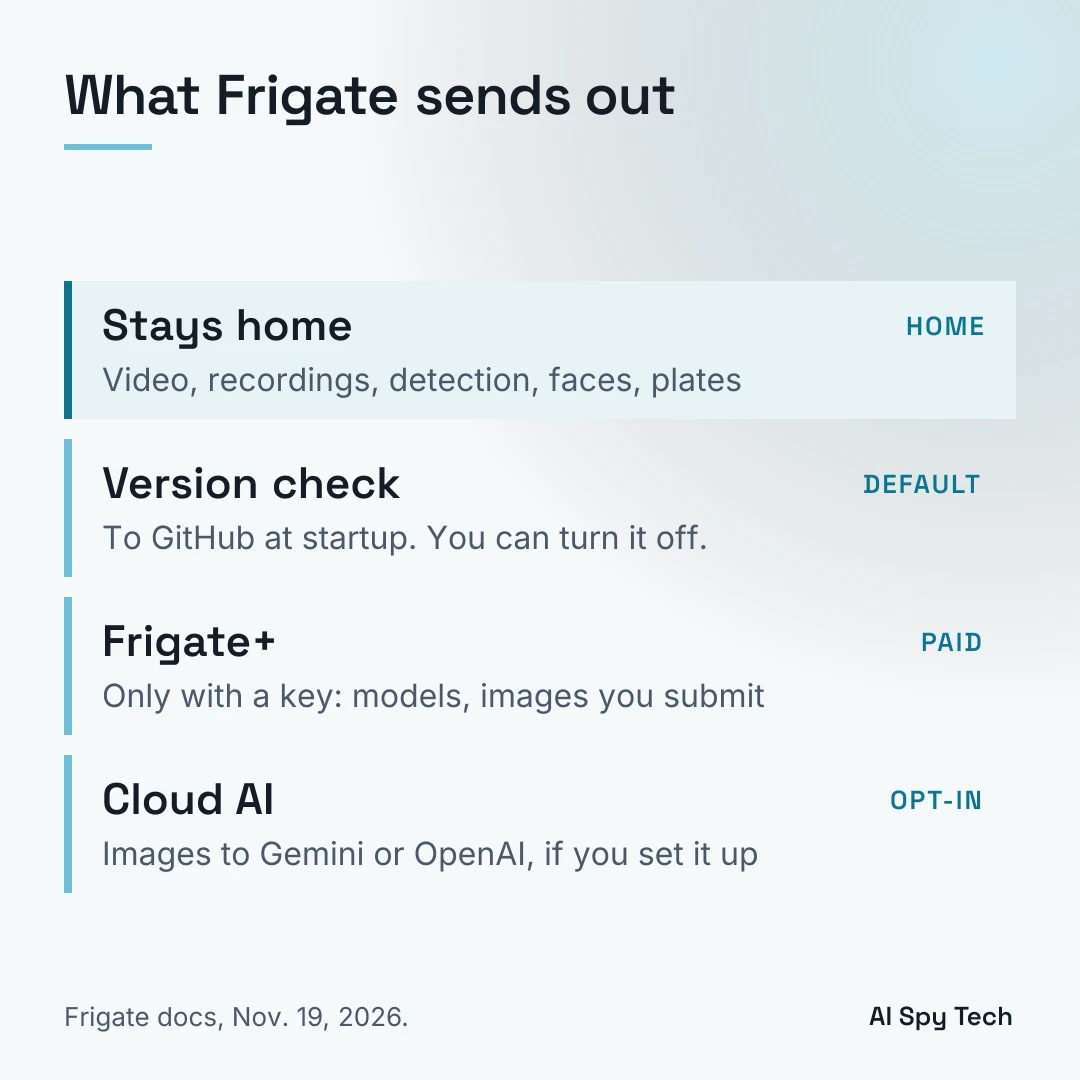
Frigate's network requirements page says it "is designed to run locally and does not require a persistent internet connection for core functionality," and that it "can run fully offline as long as all required models have been downloaded and no cloud-dependent features are enabled." The same page lists the connections Frigate can make to the outside. Here are the ones most home users will meet, with how to stop each one:
| What goes out | When | How to stop it |
|---|---|---|
| A version check to GitHub | On startup | Set version_check: false under telemetry in the config |
| AI model downloads | The first time you turn on a feature that needs a model | Download once, then run offline |
| Frigate+ traffic to Frigate's servers | Whenever a Frigate+ API key is set: model downloads, plus the images, labels and false-positive reports you submit | Remove the Frigate+ API key: the docs say this disables "all Frigate+ network activity" |
| Images and prompts to an AI provider | Only if you set up a generative AI provider (used for descriptions, chat and camera monitoring) | Use llama.cpp, or Ollama with a model on your own computer (Ollama can also send requests to its cloud), or leave generative AI off |
| Images to a DeepStack or CodeProject.AI server, or messages to an MQTT broker | Only if you set one up | Run the server or broker on your own network |
| Push alerts | If you turn on browser notifications | Frigate "sends push messages through the browser vendor's push service" |
| A connection to Google's public STUN server | Only as a fallback in the web page's live video player (WebRTC); Frigate's streaming server uses a local one by default, "no internet required" | The page lists no separate switch for the fallback |
The one to read closely is generative AI. Frigate can write a text description of what a camera saw, such as "a delivery driver left a box on the porch." The generative AI docs list five built-in providers: Ollama, llama.cpp, OpenAI, Gemini and Azure OpenAI. "Local providers run on your own hardware and keep all data processing private," the docs say, while cloud providers "require an active internet connection to send images and prompts for processing." The object description page says Frigate sends images from the detect stream "collected over the object's lifetime," and that requests go out automatically at the end of each tracked object. Generative AI stays off until you set up a provider: the network page says cloud features connect "only when explicitly configured." If you turn descriptions on with Gemini or OpenAI, pictures of the people at your door go to that company.
Your cameras are a separate question. Frigate controls only what Frigate sends. A camera can still talk to its maker on its own: in 2022, The Verge reported that eufy cameras had been uploading thumbnails to eufy's cloud for alerts without making users aware. Check each camera's cloud settings, as our guide to security cameras without a subscription explains.
Hardware: what you need to run Frigate
Frigate runs in Docker, usually on Linux; the installation docs also cover Apple Silicon Macs and say "Windows is not officially supported." The hardware page sets a low bar: "Anything with an Intel CPU (with AVX + AVX2 instructions) and capable of running Debian should work fine." Its author names a favorite: "My current favorite is the Beelink EQ13 because of the efficient N100 CPU and dual NICs." The same page warns that "the Beelink EQ14 has some known compatibility issues." Many mini PCs ship with Windows, the docs note, "and you will need to install Linux."
The AI part needs a detector: the chip that runs the object detection model. Frigate starts with a CPU detector, but the detector docs say "the CPU detector is not recommended for general use." The hardware page groups the detectors it suggests by computer type:
- Intel: OpenVINO, which runs on "6th Gen Intel Platforms and newer that have an iGPU" (built-in graphics). The docs list an Intel N100 at about 15 ms per detection with the MobileNetV2 model, and note that it "can only run one detector instance."
- Most hardware: Hailo-8 and Hailo-8L accelerators, and the Google Coral. The docs say Frigate supports both Hailo modules "on compatible hardware platforms, including the Raspberry Pi 5 with the PCIe hat from the AI kit," and list about 6 to 7 ms per detection on the Hailo-8 and 10 to 11 ms on the Hailo-8L with their default small models.
- Apple Silicon: M1 and newer, with a separate detector client because the chip cannot be reached from a container.
- Nvidia: graphics cards; Jetson boards are community supported.
- AMD: ROCm.
The docs explain why a detector matters: "Using a recommended detector means there will be less latency between detections and more detections can be run per second."
Google Coral: still supported, no longer recommended
For years the Google Coral, a small AI chip on a USB stick or card, was the standard Frigate add-on. The Frigate docs have changed their advice. The hardware page now says: "The Coral is no longer recommended for new Frigate installations, except in deployments with particularly low power requirements or hardware incapable of utilizing alternative AI accelerators for object detection."
That does not mean it stopped working. The same page says Frigate "will continue to provide support for the Coral TPU for as long as practicably possible," and the Coral is still on the list of officially supported detectors. If you already own one, keep using it. If you are buying today, look at OpenVINO on an Intel computer or a Hailo card first. One member of the Privacy Guides forum wrote that the Coral "was hard to find for a while."
Best cameras for Frigate
Frigate needs cameras that send video over your local network, usually through a stream type called RTSP. The hardware page gives this advice:
- Brands: "I recommend Dahua and Hikvision." The author adds that "Dahua edges out Hikvision because they are easier to find and order, not because they are better cameras."
- Wired, not Wi-Fi: "WiFi cameras are not recommended as their streams are less reliable and cause connection loss."
- Night picture: "Larger sensors are better than higher resolutions; especially at night."
- Video format: cameras that output H.264 video and AAC audio "will offer the most compatibility," and cameras with more than one stream (a full-quality stream and a smaller one) help.
- Reolink: "Many users have reported various issues with 4K-plus Reolink cameras," so "it is best to stick with 5MP and lower for Reolink cameras."
Amcrest cameras connect "via RTSP," per Frigate's camera-specific page, which groups them with Dahua.
Does Frigate work with Ring, Nest or Arlo?
Not directly. The Frigate docs do not list Ring, Nest, Arlo or Blink, and those cameras send their video to their company's cloud rather than offering a local stream. Some eufy models can turn on a local RTSP stream, per eufy's support pages, so check your model.
There are workarounds, but they do not take Ring's cloud out of the picture. A third-party project called ring-mqtt can pass a Ring camera's live video along to other software. Its README says it "uses the same cloud based API used by the Ring apps" and "does not enable local control of Ring devices as there is no known facility to do so." It also says that while a Ring Protect subscription is not technically required, "many capabilities are not possible without a subscription." On Reddit's Home Assistant forum, one Nest owner described using Frigate with Home Assistant to replace a Nest Aware subscription.
If keeping video off a company's servers is the goal, the plain answer is wired IP cameras that stream locally.
Frigate and Home Assistant
Frigate and Home Assistant, the open-source smart home hub, are often set up together. Frigate's Home Assistant page says "the best way to integrate with Home Assistant is to use the official integration," which is "available via HACS" (the Home Assistant Community Store) and "requires the mqtt integration to be installed and manually configured first." With it, Frigate's detections show up in Home Assistant and can trigger lights or alarms.
You do not need Home Assistant to run Frigate. The integration is an extra for people who already use Home Assistant; Frigate "must be installed and running before setting up the integration."
Frigate+: what it costs and what it sends
Frigate+ is an optional paid service from Frigate's makers. It costs "$50/yr," according to the Frigate+ page, and gives you access to Frigate+ models plus up to 12 fine-tuned models a year trained on your own cameras.
Here is the privacy part. The Frigate+ FAQ says the only images sent are "the ones you specifically submit via the Send to Frigate+ button or upload directly," and that "all processing is performed locally as always." Images you send also help train the shared model: the Frigate+ docs say the base model is "trained from images uploaded by all Frigate+ users." If you stop paying, models you already downloaded "will keep working indefinitely."
Does it cut false alerts? On GitHub, Frigate's creator said in April 2024 that his own fine-tuned model "now reproduces only 1.5% of my reported false positives," adding, "I expect results to vary by user."
Face recognition and license plate recognition
Frigate added both in version 0.16 in August 2025. Neither needs Frigate+.
- Face recognition is "disabled by default," per the face recognition docs. It runs on your own computer and keeps face photos in Frigate's media folder, which you can clear from the Frigate UI. You train it with photos: 5 to 10 at minimum, 20 to 30 recommended. The docs warn that accuracy "is heavily dependent on the quality of data given to it for training."
- License plate recognition is also "disabled by default," per the plate recognition docs, runs locally, and needs at least 4 GB of RAM. It works best when "the license plate is clearly visible."
Local processing keeps this data away from a company, but it is still face and plate data about people who did not choose to be recorded, such as neighbors, delivery drivers and people walking by. Point cameras at your own property. Ring turns its Familiar Faces feature off in Illinois, Texas and Portland, Oregon, per Ring's support page, and Google says its familiar face detection is not available for cameras in Illinois, per Google Nest Help; our guide to facial recognition cameras covers those laws. Check your state's rules before you turn face recognition on.
Frigate vs Blue Iris vs Scrypted vs Agent DVR
All four can keep your video at home. Prices are from each maker's site.
| Frigate | Blue Iris | Scrypted | Agent DVR | |
|---|---|---|---|---|
| Price | Free; optional Frigate+ $50/yr | $99.95 full (up to 128 cameras), $39.95 LE (1 camera); updates after year one $44.95/yr | Open-source core; the Scrypted NVR plugin is paid, $40/yr with 4 licenses, $10 per extra license | Free "for private local use"; a license is needed for HD viewing, "local learning AI," remote access or business use; plans from $7.95/mo |
| Runs on | Linux (Docker), Apple Silicon Macs | Windows | Windows, Mac, Linux, Docker, some NAS boxes, Home Assistant OS | Windows, macOS, Linux, Docker |
| AI detection | Built in, with a detector chip or Intel graphics | Built in since Blue Iris 6 | Smart detections, including in HomeKit Secure Video | Needs a license for "local learning AI" |
| Best for | Privacy-first homes, Home Assistant users | Windows users | Apple HomeKit Secure Video users | Mixed computers (Windows, Mac, Linux) |
Sources: Blue Iris, Scrypted install docs, Scrypted NVR billing, Agent DVR pricing, Agent DVR download.
Blue Iris's site says that with version 6.0.1, "AI services are now BUILT-IN!" so older articles that say it needs a separate AI server are out of date. Scrypted can stream cameras to Apple's HomeKit Secure Video, which saves recorded events in iCloud.
Is Frigate hard to set up?
Easier than it was, but still a project. Version 0.18 added "Full UI Configuration," so most settings now live in a settings screen instead of a text file, per the 0.18.0 release notes. You still install Linux and Docker, find each camera's stream address, and pick a detector.
People's experiences differ. On Reddit, one Home Assistant user wrote "I am so done with Frigate NVR" and asked for something more user friendly. If you want local video without a Linux project, an NVR box sold with its cameras is the simpler path: see our guide to security cameras without a subscription.
What to buy for a Frigate setup
You need three things: a computer, cameras, and, if the computer has no supported detector, an AI chip. These three fit the Frigate docs. We have not tested them.
Beelink Mini S12 Pro mini PC (Intel N100)
A small desktop with an Intel N100 processor, 16 GB of memory, a 512 GB SSD and one Ethernet port, per the listing. The N100 is the same processor as in the Beelink EQ13 the Frigate docs favor, but this is a different model, with one network port instead of two. Its built-in graphics can run Frigate's detection through OpenVINO, so it needs no extra AI chip to start. It ships with Windows 11, per the listing, so you will need to install Linux, as the Frigate docs say. Its one M.2 slot holds the SSD, so it has no free slot for an M.2 AI card.
See the Beelink Mini S12 Pro on Amazon
Waveshare Hailo-8 M.2 AI accelerator
A 26 TOPS Hailo-8 AI chip on a small M.2 card, sold as the module only, per the listing. Waveshare's spec page lists it as M.2 Key M, 22 x 42 mm, PCIe Gen3. It suits a Raspberry Pi 5, which needs a PCIe M.2 HAT+ to hold it, per Waveshare's guide, or a computer with a free M.2 M-key slot that runs PCIe and fits a 42 mm card. On an Intel N100 like the Beelink above, you may not need it: Frigate can use the processor's built-in graphics, and the Beelink's only M.2 slot already holds its SSD.
See the Waveshare Hailo-8 module on Amazon
Amcrest UltraHD 4K PoE AI bullet camera
A wired 4K (8MP) outdoor bullet camera powered by PoE, with a 2.8 mm lens, a 129-degree view, color night vision to 49 feet, and person and vehicle detection in the camera, per the listing. It records to a microSD card, a NAS, an Amcrest NVR or a PC, and the listing calls Amcrest's cloud storage "optional." The Frigate docs connect Amcrest cameras by RTSP. It needs a PoE switch or injector for power. Frigate's docs prefer larger sensors over higher resolution for night video; the listing gives a 1/2.8-inch 8MP sensor.
See the Amcrest 4K PoE camera on Amazon
FAQ
Is Frigate NVR free? Yes. Frigate is open source under the MIT license. Frigate+, which adds fine-tuned models, costs $50 a year and is optional.
Does Frigate send my video to the cloud? No. Frigate records and runs detection on your own computer. Images leave only if you turn on a feature that sends them, such as Frigate+ or generative AI with a cloud provider like Gemini or OpenAI.
Do I need a Google Coral for Frigate? No. The Frigate docs say the Coral is no longer recommended for new installs. Intel graphics with OpenVINO, a Hailo card, Apple Silicon or an Nvidia card are the other options.
Does Frigate need Home Assistant? No. It runs on its own. Home Assistant can use its detections through the official integration.
Can Frigate recognize faces? Yes, since version 0.16. Face recognition is off by default, runs on your own computer, and needs photos of each person to learn from.
Does Frigate work with Ring cameras? Not directly. Ring cameras send video to Ring's cloud. A third-party project, ring-mqtt, can bridge them, but many features need a Ring Protect plan.
Is Frigate better than Blue Iris? It depends on your computer. Frigate is free and runs on Linux. Blue Iris costs $99.95 for the full version and runs on Windows.